
There are a few ways to bring a Mealime recipe over. Start with its link. Mealime closed on October 21, 2026 and you can no longer sign in to it, but its recipe pages are still online, so you can still find a recipe’s link. If you can’t, use any of the others.
1. Paste the recipe’s link
- Find the recipe by name at mealime.com/recipes in your browser and copy its link.
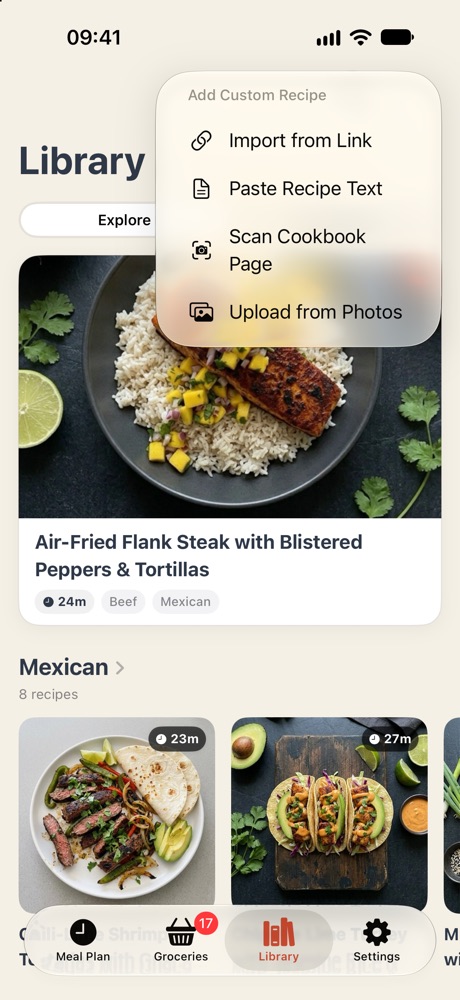
- In WeeknightBite, tap Library, then the + at the top right.
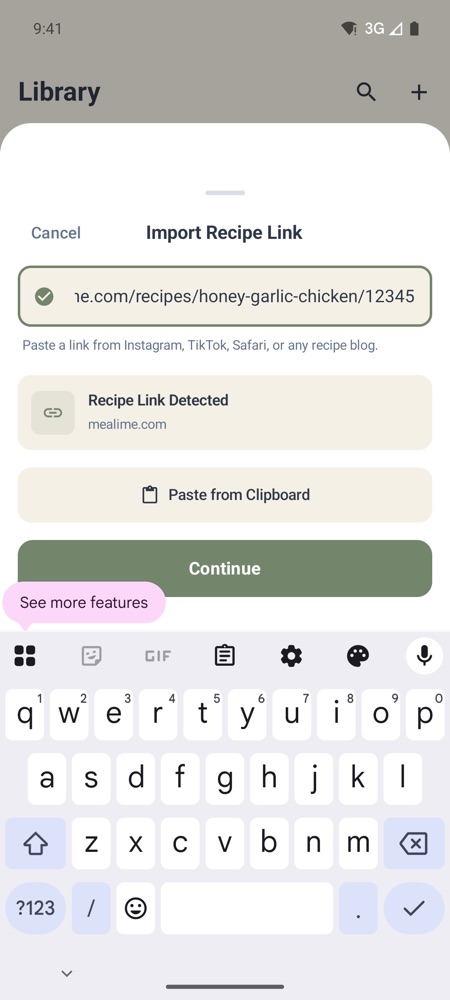
- Choose Import from Link, paste the link and tap Continue.
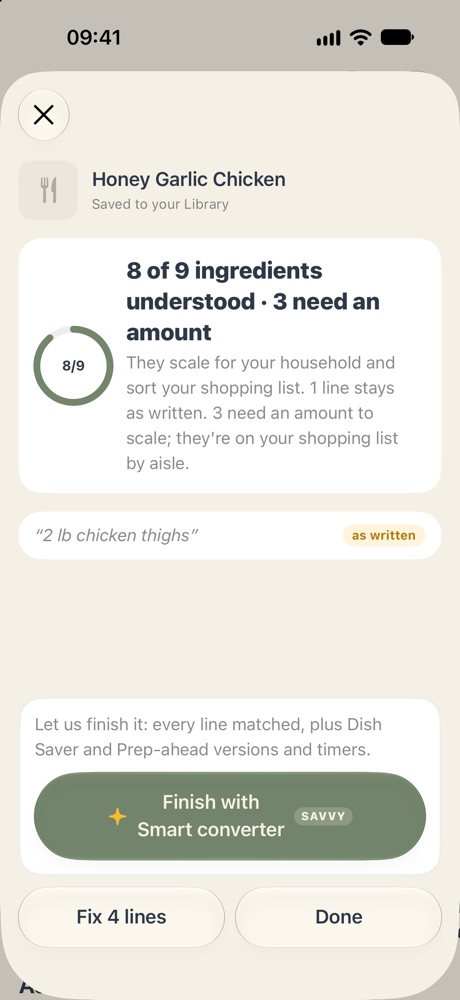
- WeeknightBite reads the recipe and saves it to your Library straight away. A sheet then says how much of it WeeknightBite understood, such as 10 of 12 ingredients understood. Tap Done.
On iPhone
On Android
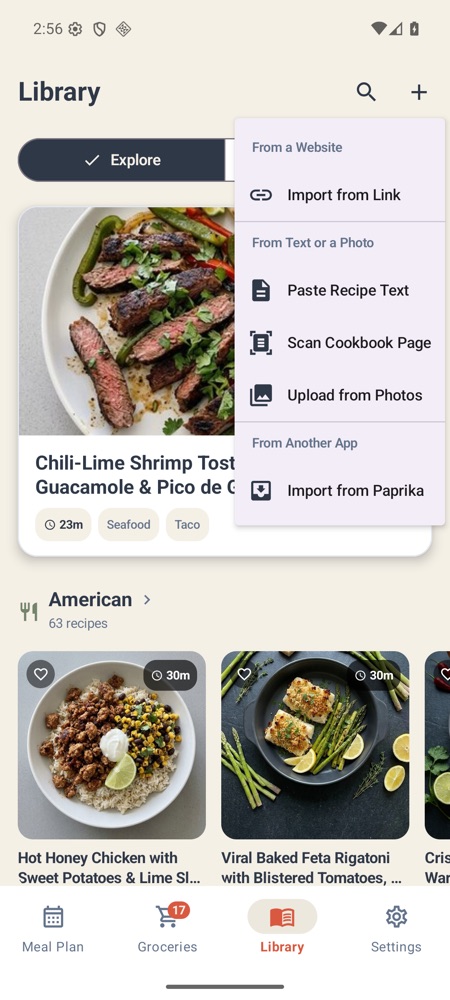
On Android
On iPhone
On Android
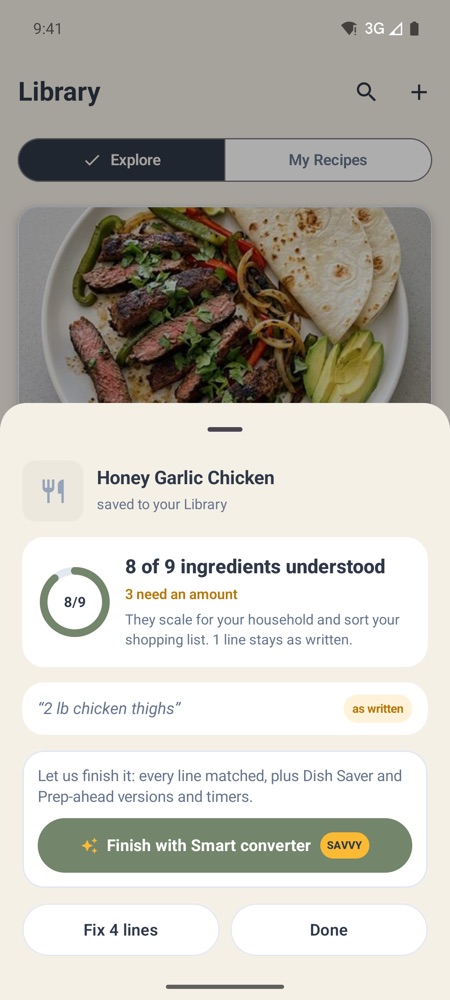
Understood ingredients scale to your household and sort your shopping list by aisle. Lines it couldn’t place stay as written, and an ingredient without an amount, such as “salt”, is understood but needs one. Tap Fix 2 lines (with your number) on the sheet to sort them out now, or later from the recipe (see Fix an imported recipe). When every line is understood, the recipe is a Smart Recipe at once.
Have WeeknightBite Savvy? The import goes straight to the Smart converter, which matches every line for you and adds the Dish Saver and Prep-ahead versions and timers. Without Savvy, Finish with Smart converter on the sheet shows the Savvy plans (see Imported recipes and Smart Recipes).
If the link won’t import, see “Recipe not found” when importing a link.
2. Or share it from your browser
Open the recipe page in your browser, tap Share and pick WeeknightBite. WeeknightBite opens, imports the recipe and shows what it understood, as above.
On iPhone
Don’t see WeeknightBite in the row of apps? Scroll to the end of the row and tap More.
3. No link? Paste the text
Copy the recipe’s ingredients and steps, then choose Library → + → Paste Recipe Text, paste them in and tap Continue.
4. Or use a screenshot
Take a screenshot of the recipe, then choose Library → + → Upload from Photos and pick it. WeeknightBite reads one picture per recipe, so this suits a recipe that fits on one screen. For a recipe on paper, Scan Cookbook Page uses the camera and can take several pages.
5. Or send them to us
Got a lot of recipes, or ones Mealime has already taken down? Email the recipe names or links to hello@weeknightbiteapp.com from the address you use in WeeknightBite, and we’ll add them to your library for you. Or paste the links, one per line, into our Mealime recipe rescue page.
Use the links of the recipes themselves (they look like mealime.com/recipes/… or r.mealime.com/…). A link to your Mealime favourites list only opened when you were signed in to Mealime, and nobody can sign in since it closed, so the recipes in it can’t be read.
Write to us at hello@weeknightbiteapp.com. We read and answer every email. Tell us which phone you use and what you tapped, and a screenshot helps.
Tell us what you were trying to do and what happened. We read every message.