
When a link won’t import, WeeknightBite shows Couldn’t Import Recipe: it opened the page but found no ingredients or steps on it. Usually the page is gone, or it isn’t a recipe page at all.
On iPhone
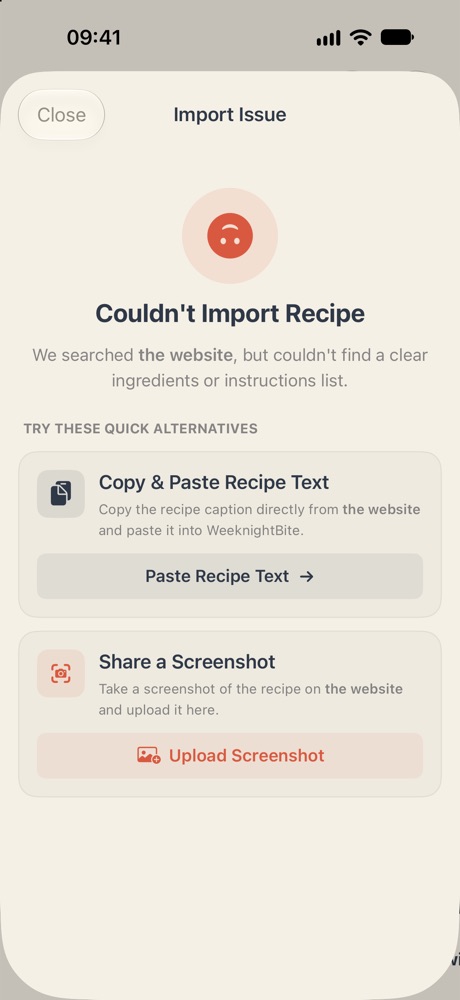
Check the page still exists
Open the same link in your phone’s web browser. Mealime closed on October 21, 2026, and had taken many recipe pages offline before that. If the browser shows a “not found” page too, the recipe is no longer on Mealime, and it can’t be imported from that link. A Mealime share link (r.mealime.com/…) no longer opens at all: look the recipe up by name at mealime.com/recipes and import that link instead.
With WeeknightBite Savvy, an import goes to the Smart converter, and a failed one comes as a notification, Smart Recipe Didn’t Work, which says why, for example that there’s no page at that link any more.
Use the recipe’s text or a screenshot
Couldn’t Import Recipe offers two other ways in: Paste Recipe Text for text you’ve copied, and Upload Screenshot for a picture of the recipe. Both also live under Library → +. A recipe saved as a PDF or a note works the same way: copy its text, or screenshot it.
Keep WeeknightBite up to date
Recipe sites change, and our updates keep up with them. If a link that should work won’t, update WeeknightBite from the App StoreGoogle Play Store and try again.
Still no luck?
Many Mealime recipes still exist elsewhere online. Send us the recipe’s name, or the link even if it’s broken, at hello@weeknightbiteapp.com, and we’ll try to add it to your library for you.
Write to us at hello@weeknightbiteapp.com. We read and answer every email. Tell us which phone you use and what you tapped, and a screenshot helps.
Tell us what you were trying to do and what happened. We read every message.