
Comparison
Mealime alternatives compared: 12 apps for busy families
Short answer
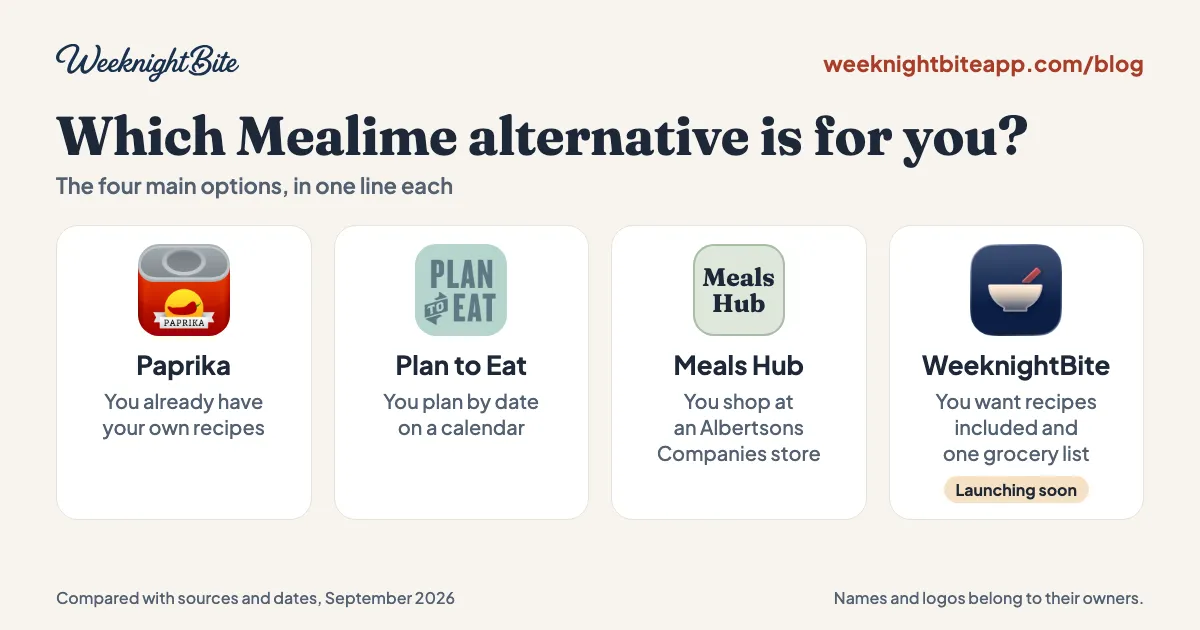
The best Mealime alternative depends on what you liked about it. Paprika and Plan to Eat are mature apps where you bring your own recipes, and Meals Hub is Mealime's official replacement. WeeknightBite, which we make, comes with a recipe library and builds one grocery list, but it has not launched yet.
We make WeeknightBite, so we have a stake in this comparison. To keep it useful, every fact about another app comes from that app’s own pages, linked below and checked on September 21, 2026. Where a claim comes from a competitor, we say so. WeeknightBite is not in the app stores yet, which makes it the only app here you cannot use today.
Mealime says it will be discontinued on October 21, 2026. If you use it, that leaves you choosing what comes next.
Which Mealime alternative should I pick?
Start from what you liked about Mealime, because these apps are built around different ideas.
- You have your own recipes and want the most control, for a one-time price: Paprika.
- You want a calendar-based planner that syncs across your phone and the web, and you will pay for a subscription: Plan to Eat.
- You shop at an Albertsons Companies store and want the least effort: Meals Hub, which is what Mealime itself recommends.
- You want recipes included and one grocery list built for you, and you can wait for launch: WeeknightBite.
- You mostly want a grocery list the whole family shares, with recipes as an extra: AnyList or Cozi.
- You want someone else to hand you the week’s plan: eMeals, Eat This Much or Mob.
The details behind each choice are below, and eight more apps follow the four main ones.
Mealime alternatives at a glance
| Meals Hub | Paprika | Plan to Eat | WeeknightBite | |
|---|---|---|---|---|
| Available now | Yes, inside Albertsons Companies apps | Yes | Yes | No, launching soon |
| Recipes included | Yes, including Mealime’s catalog | No, you save or enter your own | No, you save or enter your own | Yes, a library of 100+ recipes |
| Grocery list | Yes, shopping lists | Yes, merges duplicates; you add recipes to it | Yes, built from your calendar; merges matching items | Yes, merges quantities across recipes |
| Price | Free | One-time: $4.99 on iPhone, $29.99 on Mac | $5.95 a month or $49 a year | Free tier, plus a paid plan at $7.99 a month or $59.99 a year (US launch prices) |
| Try before paying | Free | Android and Windows free up to 50 recipes | 14-day trial, no card; no free plan | Free tier and a 14-day trial of the paid plan |
| Platforms | Albertsons Companies apps and websites | iPhone, Android, Mac, Windows | Web, iPhone, Android | iPhone and Android |
Sources: Mealime’s closing page, Paprika and its App Store listing, Plan to Eat’s FAQ, and our own product documentation. Prices are US dollars as listed on September 21, 2026.
Paprika: best if you already have your own recipes
Paprika is a recipe manager. Its App Store listing describes downloading recipes from your favorite websites or adding your own, and the homepage describes a built-in browser for saving recipes from anywhere on the web. We found no built-in recipe library.
It is sold as a one-time purchase for each platform, with no subscription. The US App Store lists it at $4.99 for iPhone and iPad and $29.99 for Mac, and its Windows page says cloud sync is included with the purchase at no extra fee. On Android and Windows there is a free version that stops at 50 recipes.
Its grocery list combines matching ingredients, for example one egg and two eggs become three eggs. Building the list is a step you take, by adding a recipe to it or using the planner’s option to add the selected meals. It has daily, weekly and monthly calendars. We found no connection to grocery delivery services in Paprika’s help guides.
Where it fits Mealime switchers: people who saved many recipes elsewhere and just want a place to keep them. Where it does not: if the reason you used Mealime was that it handed you recipes. Paprika does not list Mealime among its supported import sources.
Plan to Eat: best if you want a calendar planner
Plan to Eat is a subscription at $5.95 a month or $49 a year, with a 14-day free trial that needs no card and no free plan afterward. It runs on the web, iPhone and Android. Its FAQ states that it does not provide recipes or meal plans, because it wants you in control of the recipes in your account.
It builds the shopping list for you from your planning calendar, and combines items that share a title and a unit. Its own help page tells you to check the list before sending it to a grocery service. Plan to Eat says it can send a list to services such as Instacart, Kroger, Walmart and Amazon Fresh.
Plan to Eat has published a guide to importing Mealime recipes. It says Mealime has no bulk export, so you import recipes one at a time, by sharing from the Mealime app on a phone or pasting the link on a computer. It also advertises 30% off the first year for people leaving Mealime; check its Mealime page for the current terms.
Where it fits: you plan by date and meal, use several devices, and are happy to bring your recipes. Where it does not: you want recipes included, or you do not want a subscription.
Meals Hub: the official route
Meals Hub is the successor Mealime recommends. According to Mealime, it is free, sits inside Albertsons Companies store apps, and carries Mealime’s recipe catalog plus more. Mealime also says you can browse recipes, plan meals and build shopping lists without shopping at one of those stores, and that a web version is reached through Albertsons store websites.
It is not a transfer of your account. Mealime says personal data is deleted at shutdown and that some preferences must be set up again. Plan to Eat’s review of Meals Hub lists limits such as serving sizes of 2, 4 or 6 and no calendar. That is a competitor’s view, so try it yourself before you decide.
Where it fits: you already use an Albertsons Companies store app. Where it does not: you would rather keep your planning in a standalone app.
Eight more Mealime alternatives
These are other established apps people consider when they leave Mealime. Each entry uses only what the vendor says on its own pages, checked on September 21, 2026, and we left out anything we could not confirm.
AnyList
A grocery list app that also holds recipes and a meal-plan calendar. Lists are shared live, and it can send a list to Instacart, Walmart, Kroger and other stores. Recipes: you save your own (5 web imports are free). Price: free; AnyList Complete is $9.99 a year, or $14.99 for a household, and meal planning needs Complete.
Cozi
A family organizer with a shared calendar and shared lists. You can put recipes on the calendar and add a recipe’s ingredients to a list. Recipes: a recipe library, plus recipes you save. Price: free with ads; Gold is $39 a year and Max is $79.99 a year.
eMeals
Weekly dinner plans that build a shopping list from the meals you choose. It can send the list to stores such as Walmart, Kroger and Instacart. Recipes: 25,000+ curated recipes. Price: $59.99 a year, with a 14-day trial.
MyRecipes
A recipe-saving app from People Inc., which also publishes Allrecipes. Allrecipes promotes the app on its site. Recipes: 100,000+ from brands such as Allrecipes and EatingWell, plus recipes you save from other sites. Price: free; MyRecipes+ is $39.99 a year or $6.99 a month, with a 7-day trial.
Recipe Keeper
A recipe organizer with a meal planner and a shopping list grouped by aisle. Recipes: you save or enter your own. Price: free to download; a one-time upgrade costs $19.99 on iPhone and Android and $29.99 on Mac and Windows.
Mob
A UK recipe app with a meal planner. Its shopping list is sorted by aisle, and each person needs their own subscription. Recipes: a library of chef-created recipes. Price: $59.99 a year or $9.99 a month, with a 7-day trial that needs a card.
Eat This Much
Builds meal plans around calorie and macro targets, diet and budget. Recipes: it picks meals for you, and you can add your own. Price: free plan; Premium is $59.99 a year or $14.99 a month, with a 14-day trial.
Samsung Food
A recipe and meal-planning app with a shopping list and a large public recipe library. Recipes: 240,000+ public recipes, plus your own. Price: free; Samsung Food+ is $59.99 a year or $6.99 a month.
Sources: AnyList, Cozi, eMeals, MyRecipes, Recipe Keeper, Mob, Eat This Much and Samsung Food. Vendors change prices, so check before you buy.
WeeknightBite: recipes included, launching soon
WeeknightBite is our app, so here is what it does, in the same plain terms as the others.
What it does, as documented for launch:
- It comes with a recipe library of more than 100 recipes as of September 19, 2026, aimed at weeknight dinners. Every recipe is cooked and tested by a person before it goes in the app.
- Every recipe has two ways to cook it: as fast as possible, or with the fewest dishes to wash. On regular recipes the choice is free.
- It merges quantities across recipes into one grocery list.
- Household sharing is free, so a partner or roommate sees the same recipes and grocery list.
- It has hands-free cooking, where you move through the steps with a gesture instead of touching the screen. That is free too.
- There is a free tier, and a paid plan at $7.99 a month or $59.99 a year in US dollars, with a 14-day free trial on both. The paid plan adds full smart recipe imports, calendar-aware planning and the signature dinners. Free accounts get a limited number of imports each month.
If you want your Mealime recipes waiting for you, the waitlist and recipe rescue page takes your Mealime share links and your email, and your recipes will be waiting for you when the app launches. As of September 21, 2026, joining the waitlist or rescuing recipes on that page locks in 50% off the first year of the annual plan; check the page for the current terms.
How do I choose?
Ask yourself three questions.
- Do I want recipes handed to me, or do I keep my own? Handed to you points to Meals Hub or WeeknightBite. Keep your own points to Paprika or Plan to Eat.
- Do I want to pay once, pay monthly, or start free? Paprika is a one-time price. Plan to Eat is a subscription with a trial. Meals Hub is free. WeeknightBite has a free tier, and its paid plan costs more than Paprika or Plan to Eat, so try the free tier and the 14-day trial before you commit.
- Do I need it today? Paprika, Plan to Eat and Meals Hub are available now. WeeknightBite is not, so if Mealime is your only planner and October 21 is close, save your recipes first with the steps in our Mealime shutdown guide.
Frequently asked questions
What is the best free Mealime alternative?
Meals Hub is free, according to Mealime. AnyList, Cozi, MyRecipes, Samsung Food and Eat This Much have free versions with limits, and Paprika has a free version on Android and Windows that stops at 50 recipes. Plan to Eat has a 14-day trial but no free plan. WeeknightBite will have a free tier when it launches.
Which alternatives come with recipes?
Meals Hub, WeeknightBite, Cozi, eMeals, MyRecipes, Mob, Eat This Much and Samsung Food include recipes. Paprika, Plan to Eat, AnyList and Recipe Keeper are for recipes you save or enter yourself.
Which Mealime alternatives have a free trial?
Plan to Eat, eMeals and Eat This Much offer 14-day trials, and MyRecipes+ and Mob offer 7-day trials (Mob asks for payment details up front). WeeknightBite will have a free tier and a 14-day trial of its paid plan.
Can I import my Mealime recipes?
Mealime has not documented an export. Plan to Eat says you can import Mealime recipes one at a time, and WeeknightBite’s rescue page takes your Mealime share links. Paprika does not list Mealime as a supported import source.
Is WeeknightBite available now?
No. It is launching soon, and you can join the waitlist on our Mealime page.