
How-to
How a meal planning app builds your grocery list from the dinners you pick

Short answer
In WeeknightBite you choose your week's dinners, save the plan, and the grocery list builds itself from it. The same ingredient across recipes becomes one line, amounts are added up across units such as tablespoons and cups, and quantities are scaled to your household. The list is grouped by aisle.
A grocery list is where a meal plan either saves you time or quietly falls apart. If the list is a separate chore, with every recipe’s ingredients copied out by hand, most people stop doing it by week three. This is how the list works in WeeknightBite, step by step, with the small details that decide whether you can trust it in the store.
How do I get a grocery list from a meal plan?
You choose the week’s dinners and save the plan, and the list is built from it. There is no separate “make my list” step.
- Choose your dinners. Browse the recipe library and filter by things like time and diet, or open Suggested Weeks and swipe through whole-week plans, then use the one you like.
- Save the plan. Saving is what builds the list. Nothing is added to your list from a plan you have not saved.
- Open the Groceries tab. Every ingredient from every planned dinner is there, already combined.
The recipes come from the WeeknightBite library, and every recipe is cooked and tested by a person before it goes in the app. What follows describes the app as of September 26, 2026.
How does it combine the same ingredient across recipes?
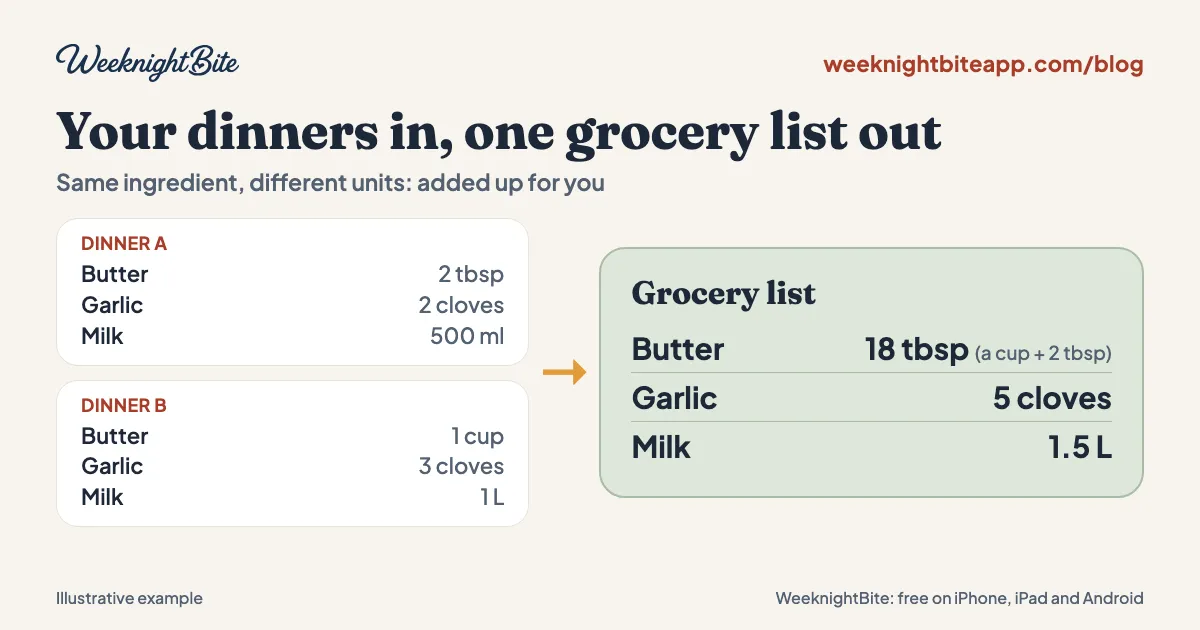
If two dinners need the same ingredient, it shows up once, with the amounts added together, even when the recipes measure it differently. That second part is where most lists get it wrong.
Suppose one recipe needs 2 tablespoons of butter and another needs a cup. A list that adds the raw numbers would say 3 tablespoons, which is off by a factor of six. WeeknightBite converts them to the same unit first. These examples match the automated tests for the app’s list logic:
| Recipe A needs | Recipe B needs | Your list shows |
|---|---|---|
| 2 tbsp butter | 1 cup butter | 18 tbsp (a cup plus 2 tbsp) |
| 500 ml milk | 1 L milk | 1.5 L |
| 300 g flour | 1 kg flour | 1.3 kg |
| 2 cloves garlic | 3 cloves garlic | 5 cloves |
Four recipes that each need 4 tablespoons of butter also show up as a single cup.
It handles teaspoons, tablespoons and cups; milliliters and liters; and grams and kilograms. When two recipes measure the same ingredient in different kinds of units, such as a volume in one and a weight in the other, it keeps both amounts on the line instead of guessing a conversion.
Does the list scale to my family?
Yes. The list is scaled to your household, and you can change the servings for a single meal.
Set the number of adults and kids in your household once, and every planned meal is scaled to fit. If one night you are cooking for guests, change the servings on that one meal, from 1 to 20. The list updates, and anything you had already ticked off stays ticked.
What can I do with the list once it is built?
Once the list exists, most of the work is making it usable in the store:
- Grouped by aisle. Items are sorted into aisles, and you can reorder the aisles to match how you walk your store. The order is shared with your household.
- Pantry check. Common staples start as “Have it”, and you choose “Need it” for the ones you actually need to buy.
- Tick off, with undo. Check items off as you go, and undo a tap you did not mean.
- Shared with your household. Anyone in your household can open the same list, and ticks show up for everyone in real time.
- Share or print it. Send the list as plain text through the share sheet, or print it as a PDF of what is left to buy.
- Apple Reminders on iPhone. If you would rather shop from Reminders, the iPhone app can sync the list there, and ticking an item in Reminders ticks it in the app.
Household sharing and the grocery list are both included free. The paid Savvy plan adds things like smart recipe imports, calendar features and the signature recipes; the pricing section of our home page has the current terms.
What happens if I change my plan after I have started shopping?
The list is rebuilt from the new plan, so the app warns you before you edit a plan once you have started ticking items. That way a swapped dinner does not silently wipe your progress. Changing the servings on a meal is different: it rescales the list and keeps what you have ticked.
What should I check in any meal planning app’s grocery list?
Whichever app you use, test the list before you trust it with a real shop:
- Does the same ingredient appear once? Plan two recipes that share an ingredient and look at the list.
- Does it add up different units correctly? Try a tablespoon in one recipe and a cup in another.
- Does it scale to your household? Change the servings and see whether the amounts follow.
- Can your partner see it? A list only one phone can open costs you a text message at the store.
- Can you reorder it? A list sorted the wrong way makes you walk the store twice.
To see how nine apps handle the list, and which ones build it for you, read the best meal planning apps compared side by side.
If you are moving from another app, our comparison of Mealime alternatives covers twelve of them, and how to export your Mealime recipes explains how to save what you cook now that Mealime has closed.
Frequently asked questions
Does the grocery list cost extra?
No. The grocery list is included free, along with household sharing. The paid Savvy plan covers other features, and current terms are in the pricing section of our home page.
Do I have to plan all seven nights?
No. Plan as many dinners as you need. The list is built from whatever is in your saved plan, so a plan for four nights gives you a list for four nights.
Does the list update if I change how many people are eating?
Yes. Changing your household size or the servings for a single meal rescales the list, and the items you have already ticked stay ticked.
Can two people use the same list at once?
Yes. Everyone in your household sees the same list, and a tick made on one phone shows up on the others in real time.
Is WeeknightBite available yet?
Yes. WeeknightBite is free to download on iPhone, iPad and Android; the button at the end of this post takes you to the App Store or Google Play. Coming from Mealime? Paste your recipe links on our Mealime page, and they will be waiting in your account.