
How-to
How to export your Mealime recipes before October 21
Short answer
To export Mealime recipes, open each saved recipe, tap Share, and copy its link; Mealime has no bulk export, but the links keep working until shutdown. Paste them into WeeknightBite's free recipe rescue tool with your email, and your recipes will be waiting when the app launches.
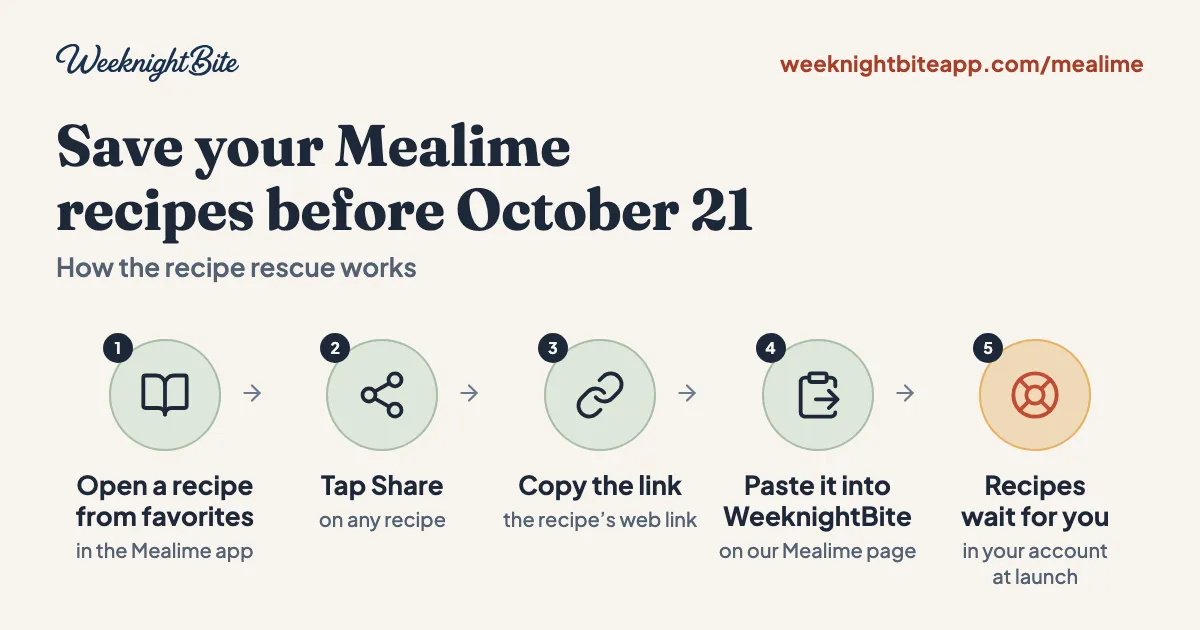
Mealime shuts down on October 21, 2026, and there is no button that exports your whole collection at once. People are already improvising: pasting links into other apps, asking an AI assistant to scrape the catalog, installing browser extensions. Most of that is more work than it needs to be for the recipes you actually cook.
Why can’t I just export my Mealime recipes?
Mealime has never documented a bulk export, and its closing page does not add one for the shutdown. What it does support is printing a recipe or the grocery list as a PDF, and sharing a link to one recipe at a time. We checked this against Mealime’s own site on September 21, 2026.
That means “exporting” your recipes is really “collecting the links to the ones you cook,” one at a time. It is slower than a real export, but it is the one path Mealime has actually built.
What are people doing to save their recipes right now?
On Reddit’s Mealime threads, the workarounds range from clever to fragile. A few people have pasted Mealime recipe links straight into Paprika’s browser importer. Others have set an AI chat tool to work scraping the whole public catalog into a spreadsheet, which worked for some but dropped ingredient variants and prep steps for others. A couple of browser extensions promise to grab your favorites list in bulk.
All of them get you some of the way. None of them are built for this specific job, so instructions go missing, variants get lost, and the steps depend on which computer you are using. If you only need the 10 or 20 recipes you actually make on repeat, copying their share links is faster and keeps the instructions intact.
How do I save my recipes in about ten minutes?
Start with what you cook, not the whole catalog. Here is the version that takes about ten minutes for a typical list of ten recipes:
- Open your favorites and recent meal plans in the Mealime app. Pick the recipes you actually make again. Most people land on 10 to 20.
- Open a recipe and tap Share. Copy the link it gives you. It should start with
mealime.com/recipes/...; if it looks different, try again from the recipe’s own page rather than a meal plan. - Repeat for every recipe on your list, pasting each link into one note as you go.
- Paste all the links into WeeknightBite’s recipe rescue tool, one per line, with your email. You are not limited to Mealime: paste in links from any other recipe site you are testing at the same time, and add more later if you think of another recipe.
- Submit, and you are done. Your recipes will be waiting for you when WeeknightBite launches, and joining locks in the launch discount.
What if I want the whole Mealime catalog, not just my own recipes?
That is a different job, and neither Mealime nor WeeknightBite’s recipe rescue tool is built for it. The rescue tool only saves links you paste in yourself, so it cannot pull in recipes you never favorited. If your goal is a big built-in library rather than your own collection, look at apps that ship with one, like WeeknightBite’s own catalog of more than 100 tested 30-minute recipes, the kind of quick dinner it is built around.
We compare the apps with their own libraries against the ones you fill yourself in Mealime alternatives compared: 12 apps for busy families.
Is there a more official way to get my data than copying links?
There is one, and it is worth sending even though it will not replace the steps above. Mealime’s privacy policy gives users the right to “receive their Data in a structured, commonly used and machine readable format,” and the request goes to privacy@mealime.com. It comes with two catches. Mealime does not commit to a turnaround time, so a request sent close to October 21 may not come back before the app closes, and what it returns is a file about your account, not a format any meal-planning app can import today. The California privacy portal the policy itself links to, mealime.ethyca.com, did not load when we checked on September 22, 2026, so email is the route that actually works. Send it if you want it, but keep copying your share links either way.
What happens after I submit my links?
Your recipes and your spot on the waitlist are saved. WeeknightBite is not in the App Store yet, so nothing imports today, but your recipes will be waiting for you in your account once it launches, and the 50% launch discount is automatic for anyone who submits.
Mealime’s share links are the one thing on a clock here: they may stop working once Mealime’s servers close on October 21. Everything else, submitting a link late, adding more recipes after the fact, is fine. Just do not wait past the shutdown date to copy the links themselves.
If you have not read it yet, our guide to the shutdown itself covers the full timeline, what happens to your account, and what Mealime has said about Meals Hub.
Frequently asked questions
Does WeeknightBite’s recipe rescue tool only work for Mealime links?
No. Paste in a link from any recipe site, one per line, alongside your Mealime links. It is meant to catch whatever you are already collecting while you decide where to land.
Do I need to make an account to save my recipe links?
No. The recipe rescue tool only asks for your email and the links you want to save.
Can I add more recipes after I have already submitted some?
Yes. Paste the new links in again with the same email and they are added to what you already saved.
Will I lose the 50% discount if I wait until after Mealime shuts down?
No, the discount does not depend on timing. What is on a clock is Mealime’s share links themselves, which may stop working once its servers close, so copy the links before then even if you submit them later.
What if a link I paste does not seem to save?
Check that it starts with mealime.com/recipes/..., which is what the Share button on a recipe page should give you. Those pages carry the standard recipe markup that link importers read; a link copied from somewhere else in the app, like a meal plan, points somewhere else and may not work the same way.